
PRICE SCHEDULER FOR WOOCOMMERCE
Your prices. Your schedule. Automatically.
Schedule WooCommerce product prices by day and time. Create recurring pricing slots, apply automatic discounts, and let your store handle price changes without manual intervention.
A smarter way to manage recurring prices
Create your pricing schedule once. Let WooCommerce automatically apply the right price at the right time.
Replace this placeholder with an actual screenshot of your plugin’s scheduling interface.
Everything you need for scheduled pricing.
Flexible scheduling tools to help you manage recurring product prices and promotions with less manual work.
Weekly pricing schedules
Create pricing slots for every day of the week, from Monday through Sunday. Set multiple time ranges within the same day to accommodate different pricing strategies.
Flexible price adjustments
Choose between fixed prices and percentage-based adjustments. Apply the pricing approach that works best for each scheduled time slot.
Automatic price changes
Let the scheduler apply the appropriate price according to your configured day and time slots, without manually editing products every day.
Reusable pricing rules
Create reusable scheduling rules and assign them to multiple products and categories. Manage pricing across larger catalogs from a centralized setup.
Simple & variable products
Schedule prices for simple products and individual variations of variable products, giving you more control over your catalog.
Countdown timers
Display countdown timers on shop and product pages to show customers when the current scheduled price ends or the next pricing slot begins.
FLEXIBLE SCHEDULING
Multiple pricing slots. Every day.
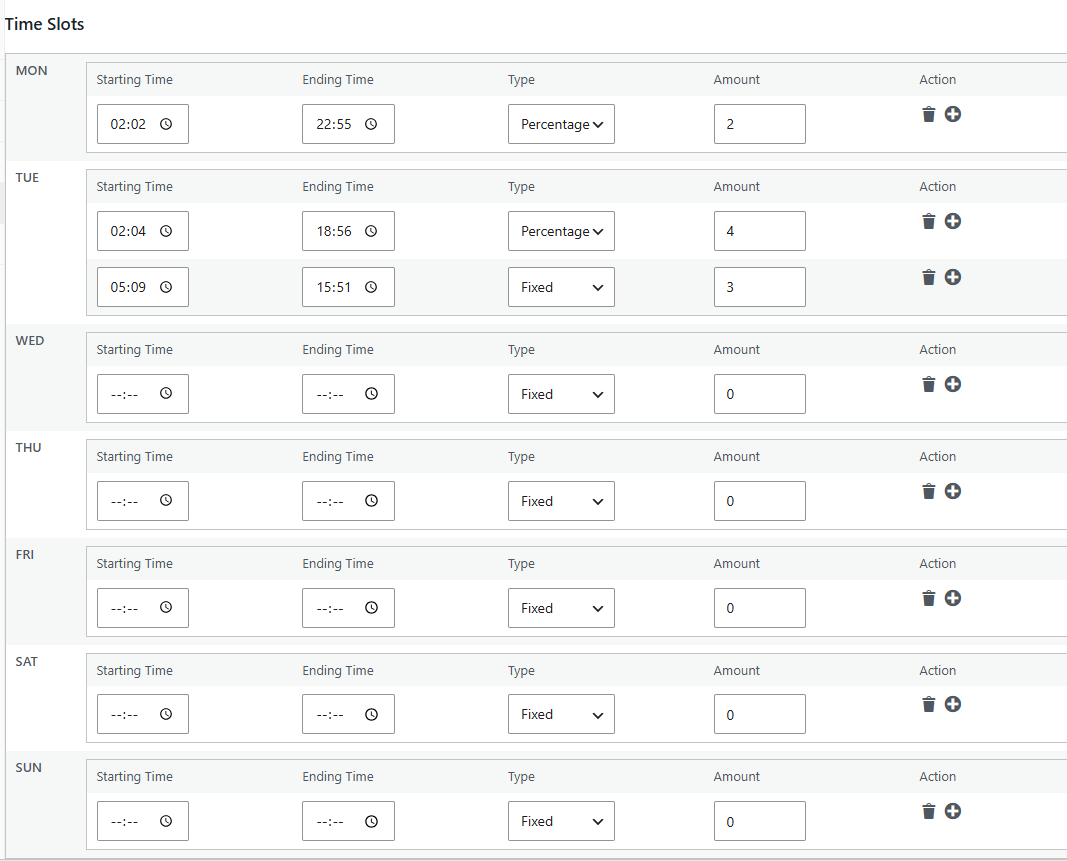
Build a weekly pricing calendar that matches your business strategy. Add as many pricing periods as needed throughout the day.
- Configure separate schedules from Monday to Sunday.
- Set multiple time slots within a single day.
- Choose fixed prices or percentage adjustments.
- Automatically switch prices when a scheduled slot starts or ends.
CENTRALIZED PRICE MANAGEMENT
One rule. Multiple products.
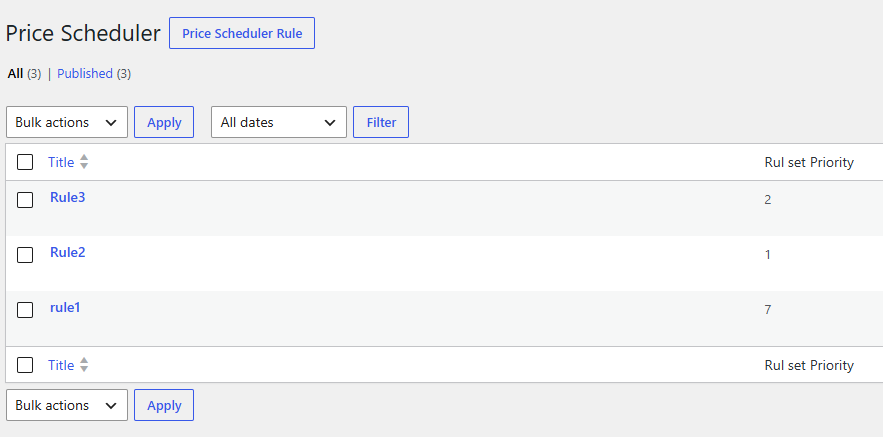
Managing scheduled prices across a large product catalog doesn’t have to be complicated. Create reusable rules and assign them to multiple products and categories.
When products are configured to inherit pricing rules, they can use the applicable schedules without requiring individual configuration.
Control pricing at every level.
Choose how individual products use the scheduling system.
Disabled
Turn off scheduled pricing for a product when you want to retain its regular pricing behavior.
Enabled
Apply pricing slots configured directly for the individual product.
Inherit
Use applicable reusable pricing rules instead of configuring schedules individually.
CUSTOMER EXPERIENCE
Make every scheduled offer visible.
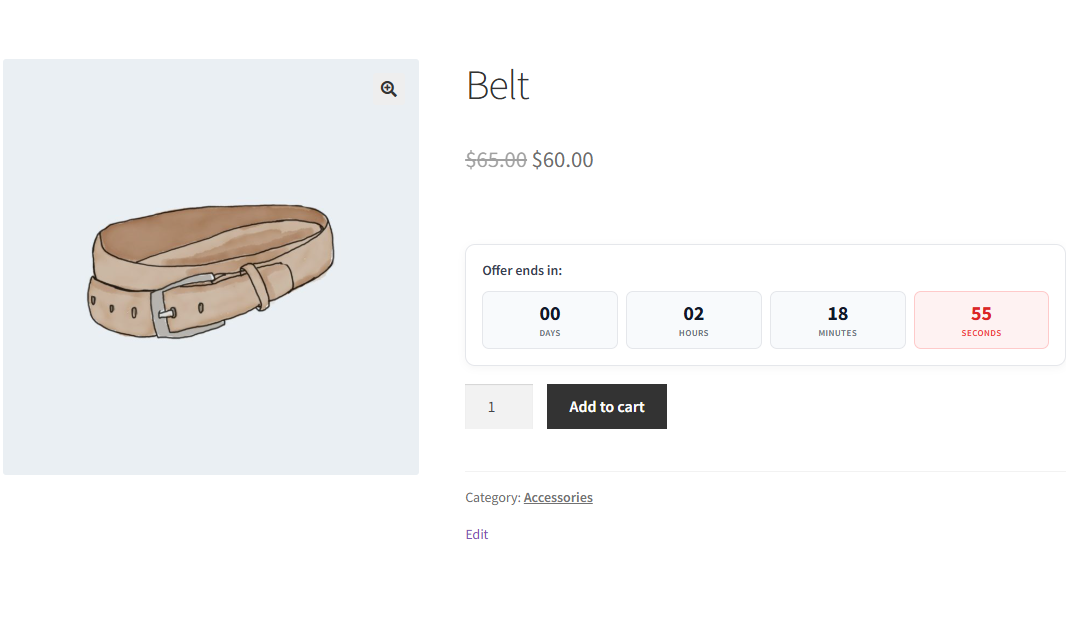
Keep customers informed about scheduled price changes with built-in countdown timers. Show when the current price or discount ends and when the next scheduled pricing period begins.
- Display timers on shop pages.
- Display timers on individual product pages.
- Customize scheduler labels.
- Control timer visibility through general settings.
How it works.
01. Create your schedule
Choose the days of the week and define the time slots when different prices should apply.
02. Configure pricing
Set a fixed price or percentage-based adjustment for each scheduled period.
03. Let it run
Your configured schedule automatically determines the applicable product price as each time slot becomes active.
Frequently asked questions
Can I schedule multiple prices for the same day?
Yes. You can create multiple pricing slots for each day of the week, each with its own time range and pricing adjustment.
Does the plugin support variable products?
Yes. Price Scheduler supports simple products and individual variations of variable products.
Can I use percentage-based discounts?
Yes. You can configure either fixed prices or percentage-based price adjustments for your scheduled pricing slots.
Can I apply the same schedule to multiple products?
Yes. Create reusable rules and assign them to multiple products and categories to manage scheduled pricing centrally.
Can customers see when a scheduled discount ends?
Yes. The built-in countdown timer can display when the current scheduled price or discount ends and when the next scheduled pricing period becomes active.
Can I disable scheduled pricing for an individual product?
Yes. Each product can use Disabled, Enabled, or Inherit mode to control how its scheduled pricing is applied.
Ready to put your pricing on autopilot?
Create recurring pricing schedules and let your WooCommerce store handle the changes automatically.
Leave a Reply